Eliminate Workout Distractions: Setting Up Your Phone’s Focus Mode for the Gym
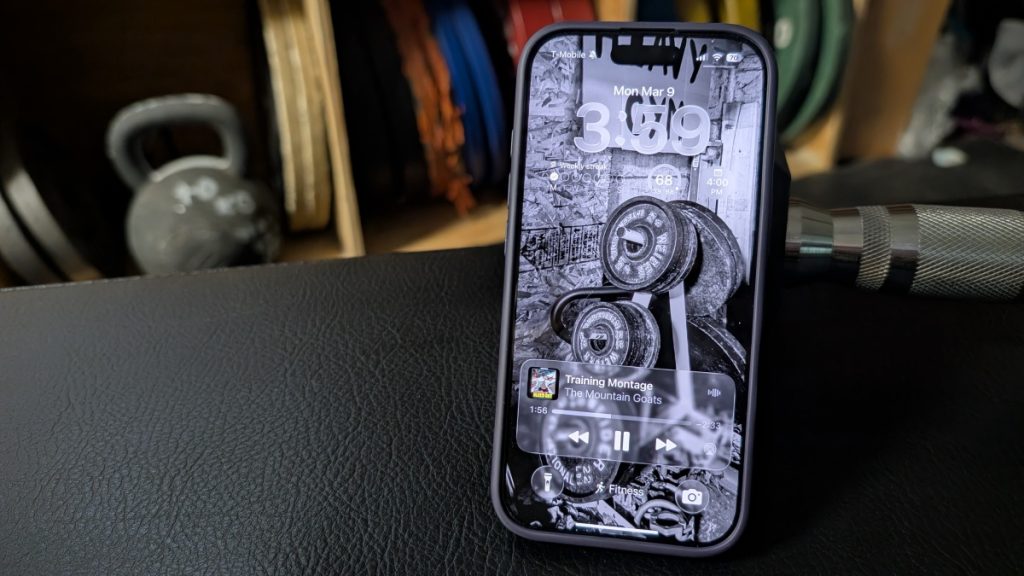
We’ve all seen them—and maybe we are them—those gym-goers who seem glued to their phones between sets. While some legitimate activities like tracking workouts and recording form videos require phone use, it’s easy to fall down the rabbit hole of social media, emails, and endless scrolling that derails your training session.
The solution isn’t abandoning your phone entirely, but rather leveraging technology to enhance rather than hinder your workout focus. Modern smartphones offer powerful focus mode features that can transform your device from a distraction into a dedicated fitness tool.
Transforming Your Phone Into a Workout Companion
Both iOS and Android devices include focus mode capabilities that allow you to customize your phone’s behavior for specific activities. On iPhones, these are called Focus modes, while Android users can find similar functionality under “modes” in their control panel.
Setting up a dedicated fitness focus mode enables you to:
-
Curate your home screen to display only workout-relevant applications
-
Block notifications from work emails, social media, and other distracting sources
-
Customize your wallpaper with motivational content, training goals, or inspirational quotes
-
Add specialized widgets that support your workout routine
Practical Setup Examples
An effective fitness focus mode might include widgets for starting Apple Watch workouts, accessing music playlists, and launching interval timers. Essential apps could include your workout tracking software, a calculator for determining training percentages, and any specialized fitness applications you regularly use. Even something as simple as changing your wallpaper to an image of weights or your fitness goals can serve as a constant reminder of your purpose.
Another approach involves using your lock screen as a digital vision board. You might display a countdown to your next competition, list your current training objectives, or showcase progress photos. The key is creating an environment that reinforces your commitment to the workout at hand.
Activation and Automation
Focus modes can be activated manually through your phone’s control center, or you can set up automatic triggers based on time, location, or calendar events. For instance, you could program your fitness mode to activate automatically when you arrive at the gym or during scheduled workout times.
When manually activating the mode, you can specify duration—whether for one hour, until a calendar event ends, or until you manually disable it. This flexibility ensures your phone supports your workout without requiring constant management.
By thoughtfully configuring your device’s focus capabilities, you create a digital environment that supports rather than sabotages your fitness goals, helping you maintain concentration and maximize the effectiveness of every training session.